
TrayTask
Download

TrayTask 1.1 (70K - Windows) - What's new?
What is TrayTask?
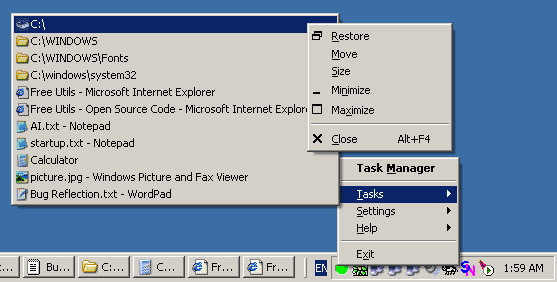
TrayTask is a utility that lets you easily control your running tasks with a simple click of the mouse!It provides you with a simple flat list of the running tasks, right from the system tray, allowing you to bring any task into focus or select any command from that task's system menu.
Functionality-wise, this is equivalent to the standard Windows task bar. However, the standard task bar looses it's ease of use when there are many open tasks - the task buttons only show a partial window title, which makes it difficult to distinguish between the different windows and wastes your time while you go hunting for the one you're looking for.
The Tasks Menu Hotkey provides a convenient alternative to the standard Windows Alt-Tab task switching functionality.
A left-click on the system tray icon brings up the Tasks Menu directly, while a right-click displays the Main Menu.
Selecting a task brings it to the foreground and activates it.
A right click on a task (Win98/2K/XP) pops up the standard System Menu, from which you can maximize, minimize or close the window.
Enjoy!
How does it look?
Installation Notes
To install TrayTask, Double-Click the setup file. This will start a Setup Wizard that will guide you through the simple installation process.To uninstall TrayTask, select the Uninstall option from the Settings menu. You can also select Uninstall from the TrayTask Start Menu group, if you selected this option during installation.
What's New?
In version 1.1:
- Added Tasks Menu Hotkey functionality.
- Fixed handling of long window titles.
- Fixed small memory leak.
In version 1.0:
- This is the first release version.
License
Copyright (c) 1999-2024 by Amichai Rothman. All Rights Reserved.This Software is Freeware.
You may make copies, install and run it free of charge.
You may redistribute it to others, complete and unmodified from its original binary form, as long as you do so free of charge as well.
For non-commercial use only.
If you find this software useful please help support it by contributing a donation!
Donate
If you like it, why not give something back?
13aWWmQqkiYnpkWT7QmE9khnpuuuG48U7o

Contact
You can contact the author via e-mail at:Please write in with any bugs, suggestions, fixes, contributions, or just to drop a good word and let me know you've found TrayTask useful and you'd like it to keep being maintained.
For updates and additional information, you can always visit the website at: